


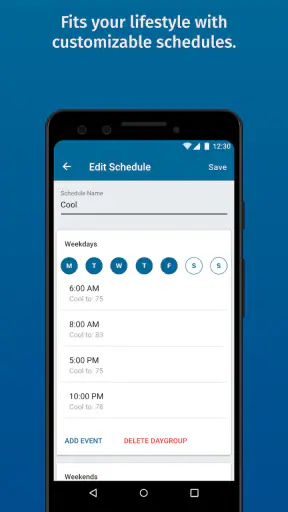
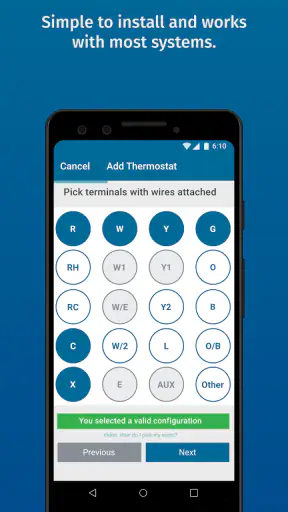
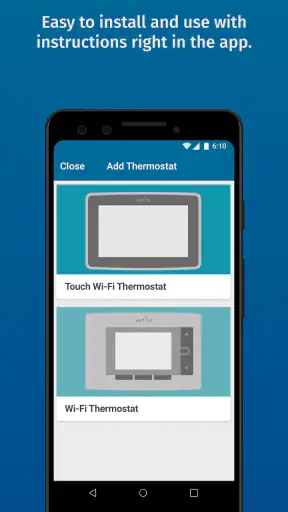
Controlling the temperature at home from a phone sounds like a small convenience until it becomes part of your daily routine. After spending time with Sensi, I found that its real value is not simply replacing the wall thermostat with a touchscreen. The useful change is being able to check and adjust home comfort when I am away, before I get back, or when my plans change unexpectedly.
Sensi is a free lifestyle app from Copeland LP, designed to work as a remote control for compatible home comfort equipment. It is available for all ages and has built a substantial audience, with more than a million installs and a 4.4 average from roughly 49 thousand ratings. Those figures make sense to me: the app is focused, familiar, and easy to understand once the thermostat connection is complete.
That last part matters. This is not a general smart-home dashboard that tries to manage every device in the house. Its purpose is narrower and more practical: give me access to the comfort controls that would normally require walking to a wall-mounted thermostat. If that is the exact problem I want to solve, the app feels useful. If I am looking for a broad automation platform, it is a different kind of product.
Remote comfort is the feature that changes the routine
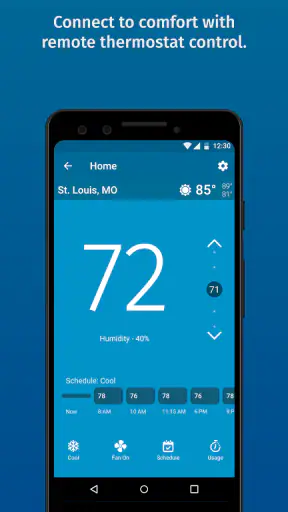
The central capability is remote thermostat control. Instead of waiting until I am physically at home, I can use the phone to interact with the connected comfort system from wherever I happen to be. That changes the timing of a decision. I do not have to leave the heating or cooling running simply because I am unsure when I will return, and I do not have to arrive at an uncomfortable house before making an adjustment.
In everyday use, this is most helpful when my schedule is less predictable than usual. A delayed trip, an early return, or a sudden change in plans can make a fixed thermostat schedule feel inconvenient. Sensi gives me a way to respond to that change manually rather than treating the original plan as permanent.
I also like the distinction between convenience and control. The app does not make the home comfortable by itself; it gives me a more convenient point of access to the system that already provides heating or cooling. That makes the experience easier to understand than some smart-home products that hide basic controls behind layers of automation.
The app is currently at version 9.7.2 and requires an operating system version of 10 or later. In practical terms, that means I would check the phone or tablet before planning an installation, especially if I am trying to use an older device kept as a household controller. The app itself is free, but the useful experience depends on having compatible home comfort hardware already installed.
What the remote connection changes
The most important effect is awareness. A traditional thermostat only tells me what is happening when I am standing in front of it. A phone-based controller lets me make the same kind of decision from another room or another location. That is particularly valuable for people who spend long periods away from home, travel between properties, or want to avoid making a comfort setting and then forgetting about it.
There is also a psychological benefit. When I leave home, I do not have to rely entirely on memory about the last thermostat setting. I can check the app and make a correction if needed. That does not guarantee a lower bill or perfect efficiency, but it can reduce the number of times I leave a setting unchanged simply because returning to the thermostat is inconvenient.
For me, this is the strongest reason to choose a connected thermostat app over a conventional wall control. It is not that the temperature adjustment itself is more sophisticated. It is that the control is available at the moment I actually need it.
Using it in practice rather than just installing it
The first stage is connecting the app to the home comfort setup. I would treat that as the part requiring the most patience. A remote-control app is only as useful as the relationship between the phone, the thermostat, and the home network. If the setup is rushed, later confusion can look like an app problem even when the issue is the connection or the equipment.
Once connected, the basic interaction is refreshingly direct. I open the app to inspect the current state, decide whether the setting still suits the situation, and make an adjustment when necessary. That simple sequence is why I prefer this kind of focused controller to a crowded smart-home app for thermostat tasks. There are fewer unrelated devices competing for attention.
One practical habit is to use the app as a check before making a change. I do not want to adjust the temperature automatically every time I open it. Sometimes the current setting is already appropriate, and the best action is to leave it alone. This sounds obvious, but remote access can encourage unnecessary fiddling because the control is always close at hand.
Another useful habit is to make changes with the return journey in mind. If I am leaving for several hours, I can review the setting rather than making a dramatic adjustment based on guesswork. When I expect to return, I can decide whether preparing the home in advance is worthwhile. The benefit is not a complicated routine; it is having the option to make a considered change without being physically present.
A realistic day with Sensi
Imagine leaving for work in the morning and realizing during the afternoon that the evening plan has changed. Instead of returning to a home prepared for the original schedule, I can open the app and check the comfort setting. If I am now coming home earlier, I can adjust it before leaving the office. If I am staying out longer, I can avoid treating the earlier plan as if it were still valid.
That scenario shows where the app earns its place. The value comes from an interruption to a routine, not from replacing a simple temperature change that I could have made by touching the thermostat. People with regular schedules may use the remote control occasionally, while people with changing schedules can find it useful several times in a week.
I would also use it when helping someone at home from a distance. For example, if another person is unsure how to change the thermostat, remote access may be easier than explaining every button over the phone. I would still want to make changes carefully, because comfort preferences are personal and a remote adjustment should not become an excuse to ignore the person actually in the room.
Where it fits beside ordinary alternatives
The usual alternative is the physical thermostat. That option remains perfectly adequate for someone who is nearly always at home and wants a straightforward control on the wall. It has no phone setup to manage and no need to reach for a separate device. For that user, Sensi may add convenience without solving a serious problem.
Another alternative is a broader smart-home platform. Those systems can be attractive when the goal is to coordinate lighting, security, speakers, and climate in one place. The trade-off is that a larger platform can feel excessive when all I want is reliable access to the thermostat. Sensi is more focused, which makes it easier to understand, but less suitable as the center of a whole-home device strategy.
I see the app as a middle option: more flexible than a conventional thermostat, but more specialized than an all-purpose smart-home controller. That position is a strength when climate control is the priority. It is a limitation when I expect one app to become the command center for everything in the house.
The strongest scenario is an unpredictable schedule
The people who gain the most are not necessarily technology enthusiasts. They are people whose home routine does not always follow the same timetable. Shift workers, commuters with changing hours, frequent travelers, and households that regularly change evening plans can all benefit from being able to reach the thermostat remotely.
I also think it suits people who worry about leaving the home in the wrong state. The app provides a way to check rather than depend on memory. That can be reassuring when the day starts in a hurry. Again, I would not confuse reassurance with guaranteed savings, but the ability to review a setting has practical value.
It can also help in a second home or a property that is not occupied continuously, provided the connected equipment and network arrangement support the intended use. In that situation, remote access matters more because visiting the wall thermostat is inconvenient by definition. The app becomes a way to stay involved with the property between visits instead of treating every adjustment as a physical errand.
For families, the benefit is less clear-cut. One person may appreciate the remote control while another may prefer the physical thermostat. I would agree on sensible household habits before relying on the app, particularly if more than one person changes settings. Without that understanding, remote control can create confusion because someone may adjust the temperature without realizing another person has already made a local change.
Three details worth considering before relying on it
First, remote control is most useful when it supports a decision, not when it replaces one. I would check the current condition before changing anything, especially after a long absence. A quick review can prevent unnecessary adjustments and helps me understand whether the app is showing the situation I expect.
Second, the app is not a substitute for a dependable physical control. I still consider the wall thermostat important for anyone at home, particularly if the phone is unavailable or the person using the room does not want to manage climate through an app. The best arrangement is one where remote access adds flexibility without becoming the only practical route to comfort.
Third, the app makes a connected thermostat more useful, but it does not remove the need to think about compatibility and setup. I would confirm that the existing comfort equipment is suitable before treating the free download as the whole solution. The app can be free while the larger installation still depends on the hardware already in the home.
These points are easy to overlook because remote control sounds self-explanatory. In reality, the quality of the experience depends on whether the app fits the household’s habits. A person who never changes plans may barely notice the difference. A person who frequently needs to make decisions away from home may notice it every week.
The trade-offs are mostly about scope and dependence
The main limitation is that Sensi is a specialized tool. I would not install it expecting a complete lifestyle organizer, a universal home dashboard, or a replacement for every thermostat-related responsibility. Its narrow purpose is also its clearest boundary.
There is a second trade-off in depending on a phone for something that used to be entirely local. A physical thermostat is immediately available to anyone standing nearby. A phone app introduces another layer between the user and the control. When everything is working, that layer is convenient. When the connection or device is unavailable, the physical control remains important.
I also think remote access can encourage overconfidence. Being able to change a setting from far away does not mean I have complete visibility into every condition in the home. I would use it for ordinary adjustments and checks, but I would not treat a phone screen as a replacement for dealing with a real equipment problem or an unusual situation at the property.
The free price is welcome, especially for someone who already has compatible equipment and only wants the app-based access. Still, “free” should be understood as the cost of the app itself, not a promise that every home can gain the capability without existing hardware. That distinction is important for anyone comparing the app with a conventional thermostat purchase or a broader smart-home setup.
The age rating of Everyone also fits the straightforward nature of the product. Even so, I would not assume that every member of a household should have unrestricted control simply because the app is easy to use. Shared access is a household decision, and temperature changes can affect comfort, routines, and energy use.
When I would choose something else
I would skip Sensi if I only need a basic wall thermostat and never expect to adjust the home remotely. In that case, the phone connection may add setup work without delivering a meaningful improvement. I would also look elsewhere if my priority were coordinating many different smart-home devices through one ecosystem rather than managing home comfort directly.
I would be cautious if the person using the system dislikes phone-based controls. A feature is not helpful when it makes a simple task feel less accessible. The physical thermostat should remain part of the decision, and the app should be judged as an additional route rather than an obligation.
On the other hand, I would favor Sensi when the existing Copeland LP ecosystem and compatible home equipment already fit the household. The app then addresses a clear gap: access when I am not standing at home. That is a much stronger reason to use it than downloading it simply because remote control sounds modern.
Who should install it
My recommendation is strongest for people who want remote home comfort control without turning climate management into a complicated smart-home project. The app is especially convincing for irregular schedules, frequent travel, second properties, and households where checking the thermostat from a distance would prevent unnecessary trips or uncertainty.
I would recommend setting it up with a simple routine: connect the compatible equipment carefully, use the app to check before changing, and keep the physical thermostat available for local control. That approach gets the convenience without making the household dependent on one method.
The app’s long presence, current version 9.7.2, and broad user base suggest a mature product rather than a novelty. Its 4.4 average and roughly 11 thousand written reviews also indicate that many users have found enough value to comment on the experience. I treat that as useful context, not a guarantee, because the result still depends on the thermostat and home setup.
Overall, I see Sensi as a practical companion for a compatible home comfort system. It does not need to do everything. Its success comes from making one ordinary household decision available at a more useful time and place. If remote access is something I would genuinely use, the free app is easy to justify. If I am happy with a local thermostat and a fixed routine, I would keep the simpler arrangement.
That is why I would recommend it to a friend selectively rather than universally. For the right home, the ability to check and adjust comfort from away is a meaningful everyday improvement. For the wrong home, it is simply another control layer. Knowing which of those situations describes me is the key to deciding whether Sensi belongs on my phone.


